
Qatar Airways
Qatar AirwaysTravel & Local
4.31.17K Reviews
- Version
- 26.09.3
- Installs
- 10.00M
- Age Rating
- Everyone
Screenshots

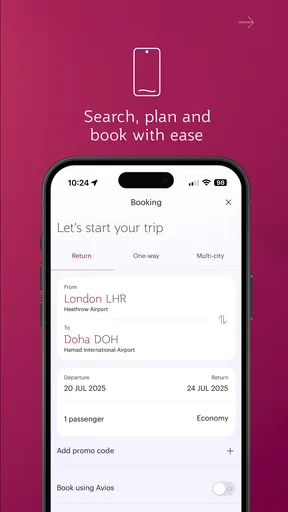
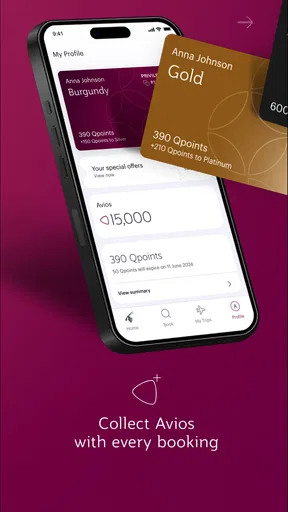
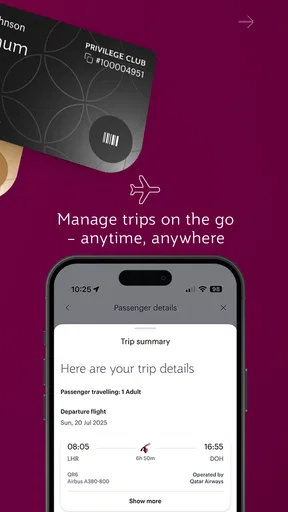

Our Review of Qatar Airways
 Analysis by Appyee
Planning a flight is usually easy until several small tasks arrive at once: checking a schedule, managing a booking, preparing for airport time, and keeping travel details close at hand. Qatar Airways is the official travel app from Qatar Airways, and I found its main value in bringing those airline-related jobs into one place instead of making me switch between a browser, email, and separate travel tools. It is free, aimed at everyone, and belongs naturally in the Travel & Local category.
I would recommend it first to people who regularly fly with this airline or already have a Qatar Airways booking to manage. It is less compelling if you only want to compare every airline impartially, build a complete multi-airline itinerary, or search for the cheapest possible route across different carriers. In those cases, a broad travel search service remains more useful. This app is at its best once Qatar Airways is already part of your trip.
What the app feels like in everyday travel planning
My first impression is that the app is designed around a direct travel relationship rather than general tourism discovery. You are not opening it to browse a huge collection of unrelated hotels, attractions, or transport companies. You open it because Qatar Airways is involved in your journey and you want the airline’s own tools nearby.
That focus makes the experience easier to understand. Instead of learning a large marketplace interface, I can approach it with a specific purpose: look at a flight, handle a reservation, or keep travel information accessible while moving between home, the airport, and the destination. The store summary presents the app as covering flying, travel, shopping, and live information, so it is broader than a simple booking shortcut, while still staying centered on the airline.
Qatar Airways is the developer, which matters when deciding where to manage an airline reservation. An official airline app can be more practical than a third-party service for airline-specific details, because the journey is connected directly to the carrier rather than represented through an intermediary. I still prefer keeping confirmation emails and important travel documents available separately, but the app gives me a more convenient operational layer for the trip.
The app has been available since December 9, 2012, and its current version is 26.09.3. That long presence suggests a product that has had time to evolve rather than a newly launched experiment. It also has a 4.3 average from around 68 thousand ratings, with more than 10 million installs. Those figures do not guarantee a perfect experience, but they do indicate that the app is familiar to a substantial number of travelers.
Speed expectations before you travel
For ordinary tasks, I expect the app to feel more efficient than opening a mobile browser and repeatedly searching for the airline’s site. The benefit is not necessarily dramatic raw speed; it is the reduction in small steps. A dedicated app is already positioned for airline use, so I can start from the travel context instead of reconstructing it each time.
That distinction becomes important when I am checking something quickly. At home, a few extra seconds rarely matter. At an airport, when I am standing with luggage or trying to confirm the next step, a clear route to the relevant travel information matters much more than a visually elaborate interface. I value the app most when it helps me avoid unnecessary navigation.
I would not treat it as a replacement for every travel search tool. A comparison service may be faster when my only question is which airline offers the best combination of price, timing, and route. Qatar Airways is more focused: it should save time after I have chosen this carrier, not necessarily during the entire research phase.
What happens during heavy-use moments
The most demanding moments are not necessarily the ones with the most complicated screens. They are the moments when I need information immediately: preparing to leave for the airport, checking a trip while changing plans, or trying to orient myself during a busy travel day. This is where a travel app earns its place on my phone.
I would use it before leaving home to review the practical parts of a Qatar Airways journey, then again at the airport rather than relying on memory. That two-stage workflow is more useful than opening the app only after something goes wrong. Checking the relevant information in advance gives me time to notice a problem while I still have a stable internet connection, a charger, and a calm environment.
There is also a useful division of labor between the app and other tools. I would use Qatar Airways for airline-specific handling, but keep a screenshot or saved copy of essential confirmation details when appropriate. An app can be convenient without being the only place where I store something important. That is especially sensible for travelers who may face weak connectivity, a low battery, or a crowded airport network.
For frequent travelers, the app’s value grows through repetition. If I fly with the same airline several times, learning one familiar workflow is easier than adapting to a different third-party booking interface for every trip. For an occasional traveler who has only one Qatar Airways booking, the benefit is more limited but still worthwhile if the app reduces the need to search through messages and browser tabs.
Reliability and recovery when plans become stressful
Reliability in a travel app is not just about whether it opens. I also care about how quickly I can recover when I make a mistake, lose my place, or return to the app after dealing with airport staff. A good travel companion should let me resume a task without forcing me to remember every step.
My practical advice is to use the app proactively, not as an emergency-only tool. Open it while you still have time, review the booking-related information you need, and make sure you understand where the relevant section is. This creates a simple recovery plan: if the app takes longer than expected later, I already know what I was looking for and can fall back to the airline’s other official communication channels.
I also would not assume that an app can replace airport announcements, staff guidance, or formal travel documents. Those sources remain important when a situation changes quickly. The app is best viewed as an additional control panel for your trip, not as the sole authority for every operational decision.
That balanced approach is particularly important for travelers with tight connections or complex journeys. If a missed connection could create serious consequences, I would keep the booking reference and other essential details accessible outside the app as well. This is not a criticism unique to Qatar Airways; it is good travel practice whenever a phone app is part of the process.
Device constraints and the cost of keeping it installed
The listed minimum operating system is version 10, so compatibility is not universal across every older phone. Before planning to depend on it, I would check the device’s system version rather than discovering the limitation at the airport. Travelers using an older handset may need to rely on the mobile website or another official channel instead.
On a compatible device, the main resource question is less about having a powerful phone and more about practical travel conditions. A nearly full battery, limited storage, unstable connectivity, or an outdated operating system can make any travel app less dependable. I would install and open it before the journey, update it when convenient, and avoid waiting until boarding time to discover that the phone needs maintenance.
The app is free, which removes the financial barrier to trying it. That does not mean every traveler needs to keep it installed permanently. If I fly Qatar Airways once and rarely travel, I might install it for the trip and remove it afterward. A frequent passenger, on the other hand, can justify keeping it available because repeated access to the same airline ecosystem is where the convenience becomes noticeable.
The Everyone content rating also makes it suitable for a broad audience. Families can use it as part of their travel preparation, while older relatives who prefer straightforward airline-specific tools may find a dedicated app less confusing than a large travel marketplace. I would still help less confident travelers set it up before departure, since familiarity matters more than age rating when the airport is busy.
Who should choose it over the usual alternatives?
The clearest choice is a passenger whose trip is already tied to Qatar Airways. For that person, the airline’s own app has a logical advantage over a general booking service: it is built around one carrier’s travel process. It can sit beside a comparison app rather than compete with it. I might search broadly first, then move to Qatar Airways for the airline-specific part of the journey.
A general travel app is better for comparing several airlines, combining unrelated carriers, or organizing a trip that includes hotels, rail journeys, car rental, and activities in one broad itinerary. Qatar Airways is not the right first stop for that kind of open-ended planning. Its strength is focus, and focus naturally means less coverage outside the airline’s world.
I would also be cautious if my travel habits are entirely browser-based. Some people prefer not to install an app for a single journey, and that is reasonable. The dedicated experience becomes more convincing when I expect to check or manage Qatar Airways travel more than once, or when I value having a familiar place to return to during the journey.
Three practical habits that improve the experience
First, I would separate planning from airport use. While still at home, I would explore the app and identify the screens relevant to my trip. Then, at the airport, I would use it for quick confirmation rather than learning the interface under pressure. This small habit makes the app feel faster because I remove decision-making from the busiest moment.
Second, I would pair it with an offline backup. The app can be the convenient live tool, while a saved confirmation message, note, or document provides resilience if connectivity or battery becomes a problem. This is especially useful for international travel, where network conditions can change between departure, transit, and arrival.
Third, I would use the app as the Qatar Airways part of a larger toolkit. A comparison service can help me decide whether the airline fits my route, a calendar can hold the overall schedule, and a separate map can support local movement. Trying to force one airline app to perform all those jobs creates disappointment. Used in its proper role, it is more focused and easier to judge fairly.
These habits also answer a common concern: whether installing the app alone guarantees a smooth journey. It does not. Preparation, backups, and realistic expectations matter. The app can reduce friction, but it cannot remove every uncertainty associated with airports and changing travel plans.
My performance verdict for real travelers
After looking at it as a daily travel utility rather than a promotional showcase, I see Qatar Airways as a sensible companion for passengers who have a direct reason to use the airline. Its perceived speed comes from focused access, its usefulness increases during repeated travel tasks, and its resource demands are reasonable in the broader sense that it is a specialized tool rather than an entire travel ecosystem.
The main limitation is also its defining trait: the app is centered on Qatar Airways. If I need broad price comparison, mixed-airline planning, or a complete destination organizer, I would choose a general travel service first. If my booking is with Qatar Airways and I want an official mobile place to handle the airline side of the trip, this app is the more natural option.
With a free price, an Everyone rating, a current version of 26.09.3, and support for devices running operating system 10 or newer, it is accessible to many travelers, though older phones should be checked before installation. Its 4.3 average and large install base make it a well-established choice, but I would still prepare a backup for important travel information.
My final recommendation is straightforward: install Qatar Airways before a Qatar Airways journey, learn the basic workflow while you are calm, and keep a separate backup for essential details. I would not install it merely as a general travel browser, but for the airline-specific part of a trip, it offers the kind of focused convenience I would happily recommend to a friend.
For me, that is the right way to judge Qatar Airways: not as a universal replacement for every travel app, but as a practical official companion whose value appears when one airline is already central to the journey.
Verdict
Strengths of Qatar Airways
- Smooth booking process with clear flight and fare details.
- Mobile check-in and boarding passes reduce airport waiting time.
- Useful flight status updates and travel notifications.
- Easy access to Privilege Club rewards and membership information.
- Supports trip management, including seat and meal preferences.
Limitations of Qatar Airways
- Some features may require a stable internet connection to load properly.
- Fare conditions and extra fees can be difficult to compare quickly.
- App performance may vary on older Android or iOS devices.
- Customer support responses can take time during busy travel periods.
- Certain services and offers may depend on the departure country.
Similar Picks in This Category
View All
Google Maps
Google LLC3.4

Google Maps Go
Google LLC4.1

Booking.com: Hotels & Travel
Booking.com Hotels & Vacation Rentals4.8

Google Earth
Google LLC3.8

Skyscanner Flights Hotels Cars
Skyscanner Ltd4.8

trivago: Compare hotel prices
trivago N.V.4.4
Frequently Asked Questions
What can I do with the Qatar Airways app?
The Qatar Airways app is designed to manage most parts of your journey in one place. After signing in, you can search and book flights, check schedules and fares, manage existing reservations, select seats, purchase additional baggage where available, check in online, access your boarding pass, and review Privilege Club details. The exact options may vary depending on your route, ticket type, and departure airport.
Can I check in and access my boarding pass through Qatar Airways?
Yes, the app supports online check-in for eligible Qatar Airways flights and lets you view or save your mobile boarding pass. Check-in availability can depend on the airport, destination, passenger documentation, and itinerary. Some travelers may still need to visit the airport counter for document verification, baggage drop-off, special assistance, or other requirements, so the app should not be considered a replacement for arriving early.
Can I change or cancel a Qatar Airways booking in the app?
The app allows you to view and manage many existing bookings, although the changes available depend on the fare conditions, route, booking source, and ticket status. Eligible passengers may be able to change flights, select seats, add services, or request cancellation through the app. Fees and fare differences can apply, and reservations made through a travel agency may need to be handled by that agency instead.
Does the Qatar Airways app provide flight status and travel updates?
Yes, you can use the app to review flight information and check the status of Qatar Airways services before traveling. It may display schedule changes, gate information, delays, and other operational updates when data is available. Because airport information can change quickly, it is still sensible to check airport screens and listen for announcements, particularly during busy periods or irregular operations.
Is the Qatar Airways app free, and what permissions does it require?
The Qatar Airways app is generally free to download, although normal mobile data or roaming charges may apply when using online features. It may request permissions such as notifications, location, camera, or access to device storage, depending on the features you use. Notifications can help with travel updates, while location and camera access may support airport-related tools or document and boarding-pass functions.
